How I Earned $28.49 My First Week Using Coupert
Our readers always come first
The content on DollarSprout includes links to our advertising partners. When you read our content and click on one of our partners’ links, and then decide to complete an offer — whether it’s downloading an app, opening an account, or some other action — we may earn a commission from that advertiser, at no extra cost to you.
Our ultimate goal is to educate and inform, not lure you into signing up for certain offers. Compensation from our partners may impact what products we cover and where they appear on the site, but does not have any impact on the objectivity of our reviews or advice.
Most coupon and cashback tools look identical on paper. Coupert isn’t an exception — but how it handles coupons, cashback tracking, and incentives makes a real difference over time.

Some of the links on DollarSprout point to products or services from partners we trust. If you choose to make a purchase through one, we may earn a commission, which supports the ongoing maintenance and improvement of our site at no additional cost to you. Learn more.
Best for: Shoppers who want coupons and cashback to apply automatically at checkout (no shopping portal needed).
As someone who has evaluated the best cashback apps for over a decade now — and even operated one ourselves through DollarSprout Rewards — let me let you in on a little secret: most cashback tools operate in roughly the same manner.
The same affiliate networks for sourcing coupons. The same or similar network of participating merchants. The same default cashback rates.
So if you’re wondering if one platform has the secret sauce that’s going to magically get you a way better deal than everyone else — it’s probably not.
The subtle differences between the tools, however, can add up in a very meaningful way. To that end, we installed Coupert, ran it through real checkouts, and paid attention not just to whether it saved money, but whether it paid out as advertised and how it compares to familiar tools like Honey, Rakuten, and Capital One Shopping.
What Is Coupert?
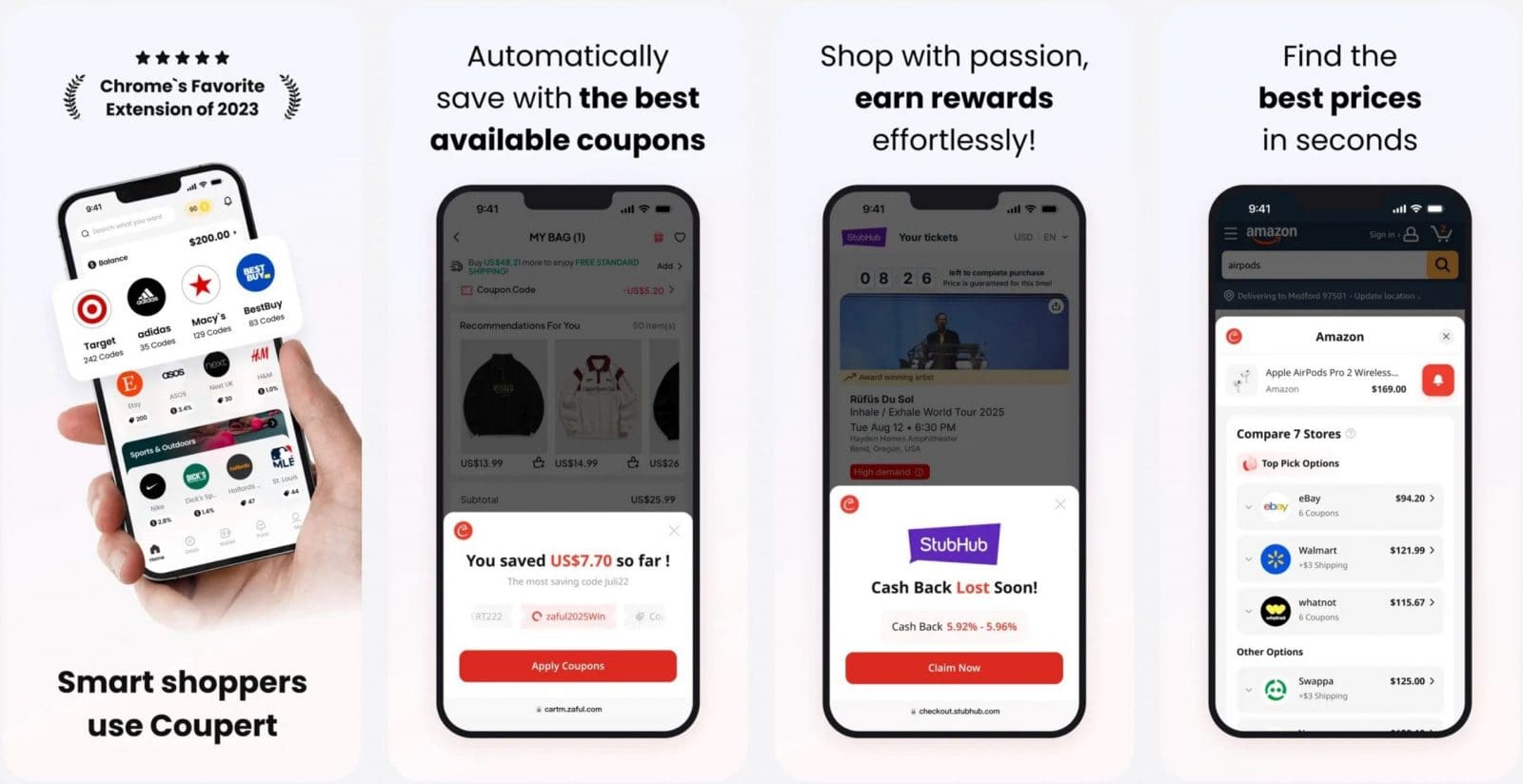
Most simply, Coupert is an AI-powered shopping rewards tool that comes in two forms: a browser extension for desktop shopping and a mobile app for phones. In both instances, it’s designed to surface available coupon codes and cashback offers while you shop online.
On desktop, Coupert runs as a browser extension that activates on supported retailer sites or at checkout, without requiring you to start your shopping session inside a separate portal. On mobile, the app plays a similar role, though savings typically require opening the retailer through Coupert rather than running passively in the background.
Coupert is free to use. The company earns money when it refers a completed purchase to a retailer, and shares part of that commission with users in the form of cashback or applied discounts.
Is Coupert Legit — or a Scam?
Founded in 2017, Coupert reports more than 8 million weekly active users, putting it squarely amongst the most widely used cashback extensions in the world. For more than four years, Coupert partnered with Microsoft Coupons to power Microsoft Coupons, giving Edge users built-in access to hundreds of millions in automatic savings.
Coupert was also featured as a standout extension in the Chrome Web Store Favorites of 2023 list — a designation that reflects its strong user ratings (4.7 stars across 10.8K ratings) and the extension’s ability to meet Chrome’s quality and safety requirements. It continues to hold a Featured badge on the Chrome Web Store into 2026.
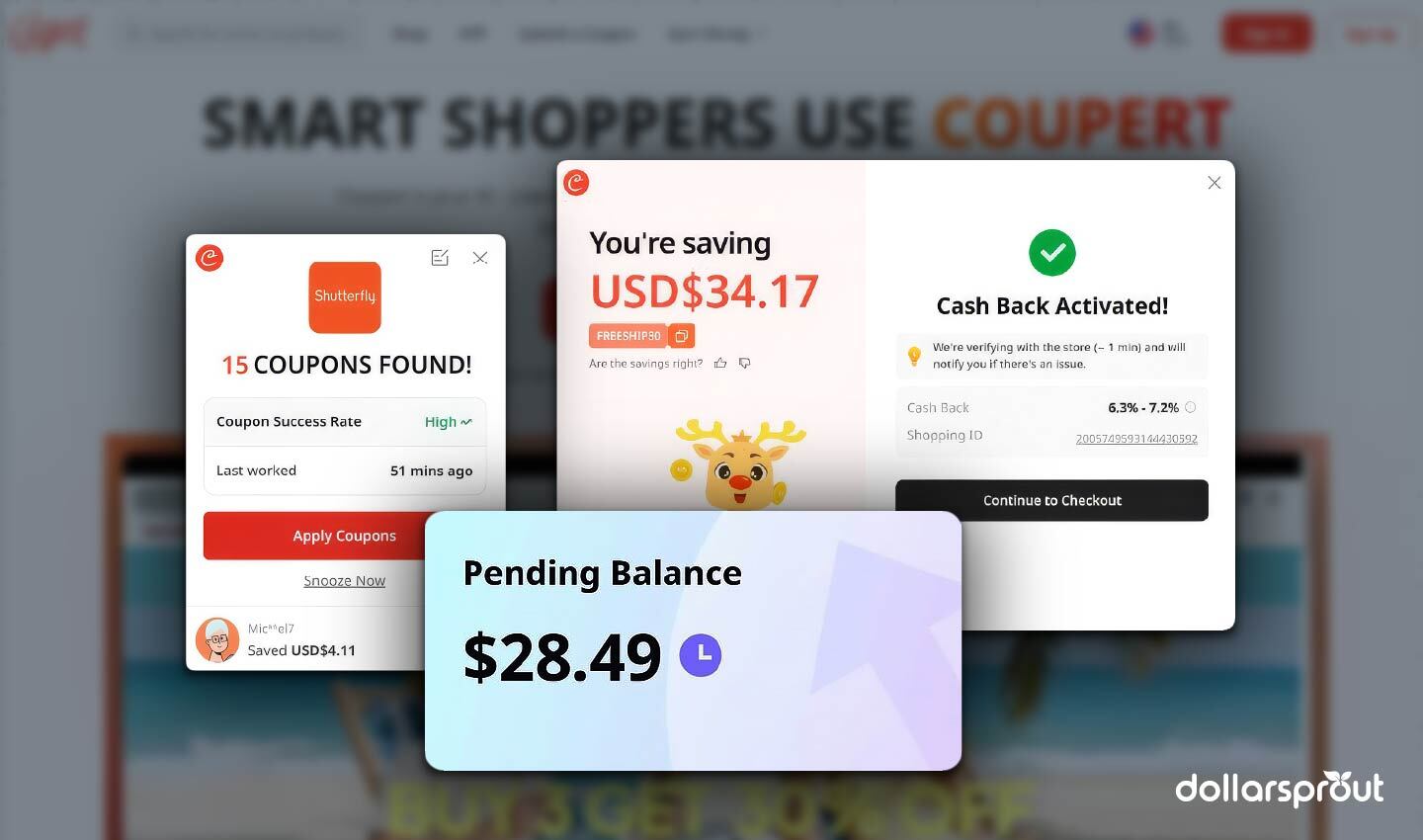
In our own testing, the tool functioned as I had expected. I was able to make purchases at several of the over 200,000 participating merchants that Coupert supports and accumulated $28.49 in cashback in my first week of use. That total came from a handful of everyday online purchases, with cashback rates mostly in the low single digits (consistent with what most users should expect).
I had preset my cashout threshold to $25 (you can set yours as low as $1 for your first cashout) and automatically received payment to PayPal after the cashback cleared. That pace won’t be typical for all users, but it illustrates how quickly small amounts can add up when cashback is available.
For context, Coupert states that the average user accumulates around $600 per year in cashback, coupon, and price-drop savings. I’ve also come across anecdotal cases of users on Reddit earning $1,000 or more in as little as six months, though I’d consider those outliers (usually involving people who shop online frequently versus those using the extension as a modest way to earn passive income).
How Much Does Coupert Actually Save?
From my experience, most of Coupert’s real-world savings come from working coupon codes. Cashback rates technically range from about 0.1% to 20% (with some merchants even higher), but with everyday shopping, it’s far more common to see rates under 3%, which I’ve found in line with other popular cashback tools.
Where Coupert can stand out is when it surfaces multiple working coupons on the same order. When that happens — especially at large retailers — the savings can add up quickly. For frequent online shoppers, I find it realistic to even exceed Coupert’s stated average of $600 per year in combined cashback, coupons, and price-drop savings. As a family of six, I regularly end up with a bit over $1,000 per year in earnings across cashback apps alone.
Less frequent online shoppers can still expect to save a few hundred dollars per year with Coupert. Results will vary and depend heavily on how you use it. Users who take the time to check which merchants offer the highest cashback rates, have the most reliable coupons, and shop online frequently will see larger returns — though it’s worth being mindful that chasing higher rewards can sometimes encourage spending you wouldn’t have done otherwise. For larger planned purchases, the strategy can be meaningful, especially if you have the luxury of waiting out price drops. For smaller orders (let’s say under $100), the savings still add up over time, but the time spent strategizing may not be worth the nominal savings.
How to Use Coupert
Signing up for Coupert is easy, and it takes a minute or less to install. After you create an account and password, the tool is ready to use.
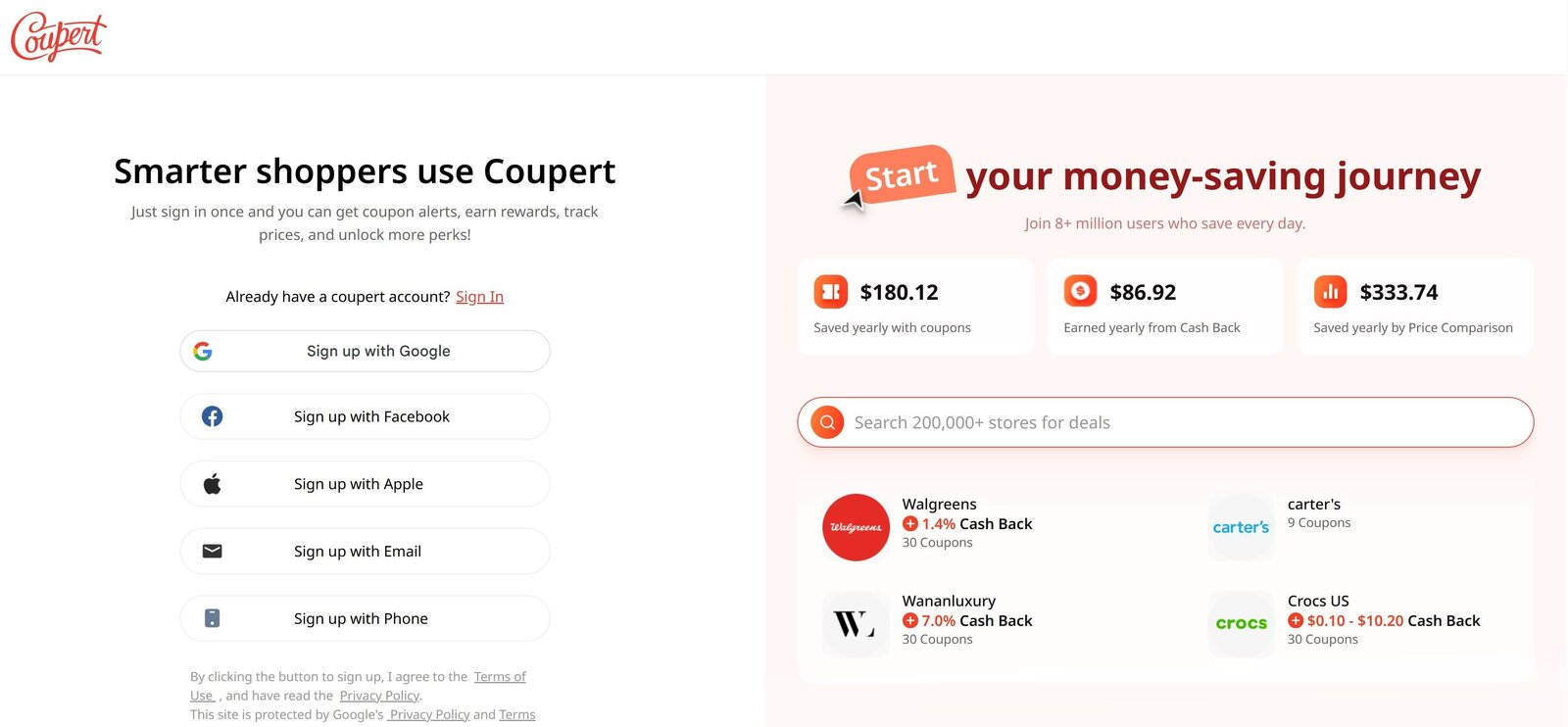
Just shop as you normally would, and pay attention to the checkout pages of large merchants to see what savings options the browser extension may present to you. Like most millennials, I have an irrational need to make large purchases on a desktop, so most of my experience is born of the browser extension perspective.
Here’s what we like (and dislike) about the three core functions.
1. Automatic Coupon Testing
Far and away the most convenient feature, Coupert works behind the scenes to find working coupon codes and tests them on your cart to see which may result in a discount. Instead of hunting across sketchy coupon sites, dealing with popups, or signing up just to “reveal” a code, Coupert runs through everything in the background and surfaces what actually works.

There’s essentially no downside: it’s free, it doesn’t interfere with checkout if no codes apply, and it can surface savings beyond straight discounts, including free shipping promos. You can even submit working coupons yourself and earn Coupert “Gold,” which is redeemable for cash, though there are some restrictions there.
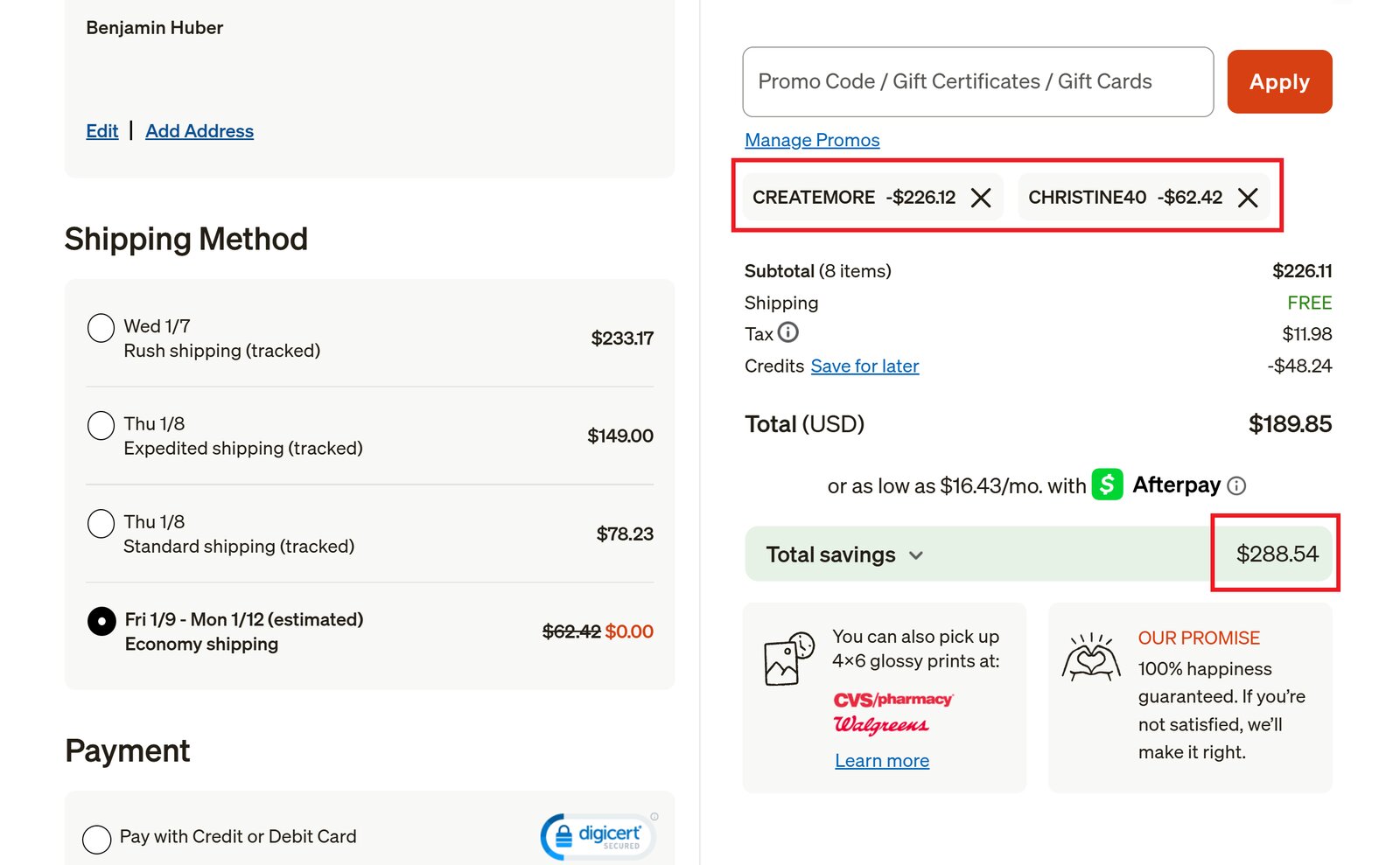
In my testing, the Coupert interface sometimes took 20–30 seconds to appear, especially on heavier retailer pages. The extension seems to be waiting for the full product page to render, so you may want to pause for a few moments before assuming that Coupert isn’t active or hasn’t found coupons for a particular merchant.
Once it loads, though, it often tests 10+ coupons in under a minute — and when it hits, it really hits. I recently saved over $200 on a Shutterfly order thanks to several codes I wouldn’t have known about otherwise.
2. Cashback Activation
Part two of Coupert’s one-two punch, users will discover cashback opportunities at tens of thousands of popular retailers, including the likes of Amazon, Target, Walmart, Best Buy, Macy’s, and more.
Unlike the automatic coupon activation, it will take some time for cashback to show in your account if you make a purchase via an eligible offer.
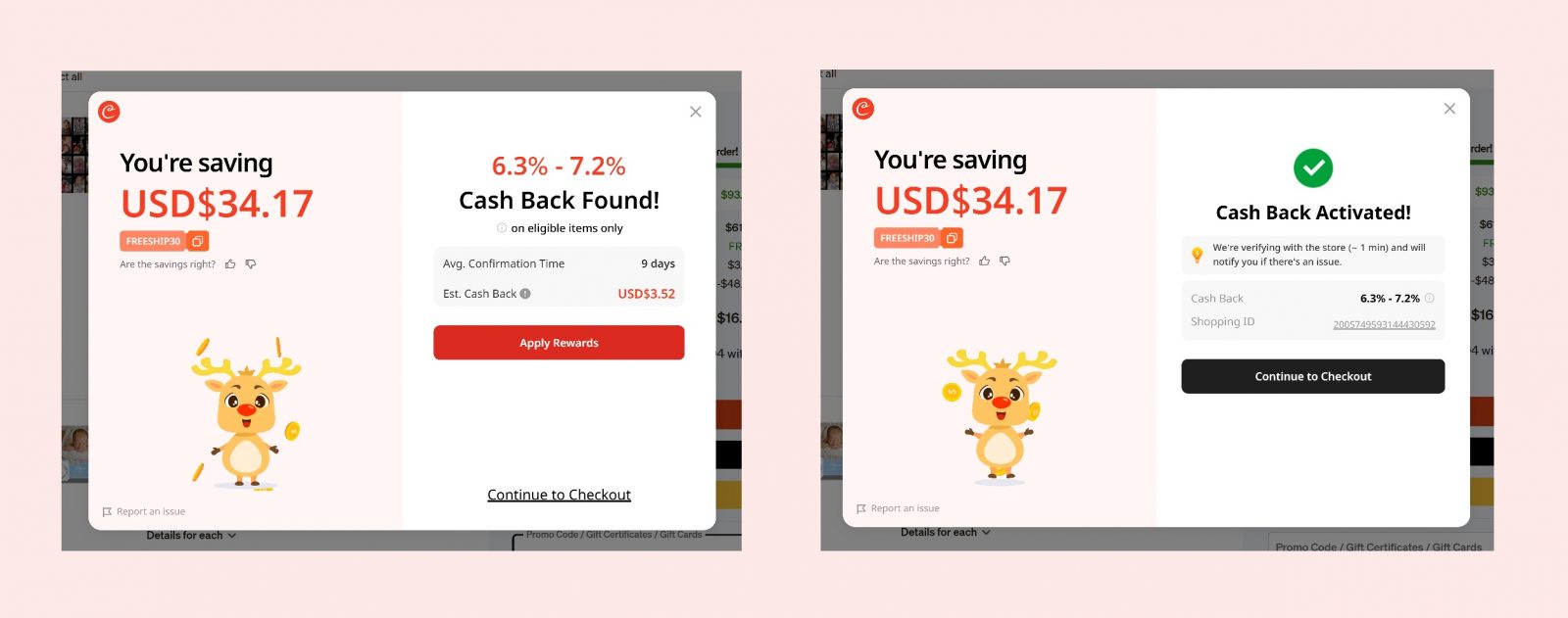
I generally see rates between 1 and 3%, with more “niche” retailers sometimes offering double-digit cashback rates (this is pretty much the norm across all major cashback tools).
One thing I do like, and don’t see with Honey, Capital One Shopping, or Rakuten, is an added layer of transparency after activating cashback. Many will confirm it’s activated, but Coupert shows a transaction ID (that long string of characters in the screenshot above) once you click through.
Even for non-technical users, that’s reassuring. It essentially tells you that the purchase was tracked, gives Coupert something concrete to verify with the merchant, and gives you a reference point if you ever need to contact support about a missing transaction.
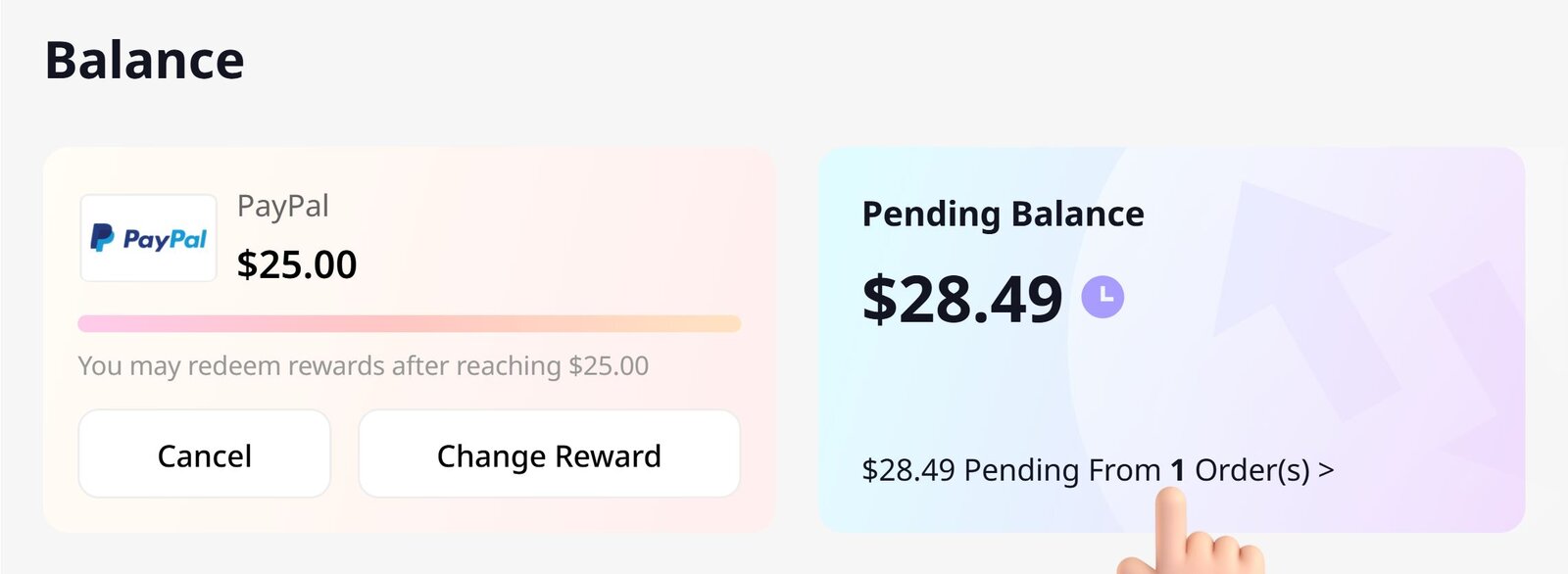
Expect up to 24–72 hours for a purchase to show as Pending, and, on average, 15–30 or so days for it to show as Confirmed. This allows merchants time to process and ship the order, and accounts for return windows before passing along a commission to Coupert, which is then split with you, the user.
Summary of Cashback Processing:
- Allow up to 72 hours for a cashback-eligible transaction to show as Pending.
- Average timeframe until a transaction is Confirmed is 15 to 30 days.
- Transactions can take up to 180 days to show as Confirmed.
It’s worth noting that the longest timeframes are because of delays in merchant payouts on commissions to Coupert, and not because Coupert is slow at passing along commissions to users.
3. Price Tracking
Coupert also offers two notable price tracking features: Price Drop Alerts and Price Comparison.
With Price Drop Alerts, users can toggle on notifications for specific items they have in mind. For example, in no hurry to spoil your child with a new PlayStation 5? Set up an alert and buy when it’s convenient for you — presumably after a merchant runs a promo or runs a steep discount on that particular console.
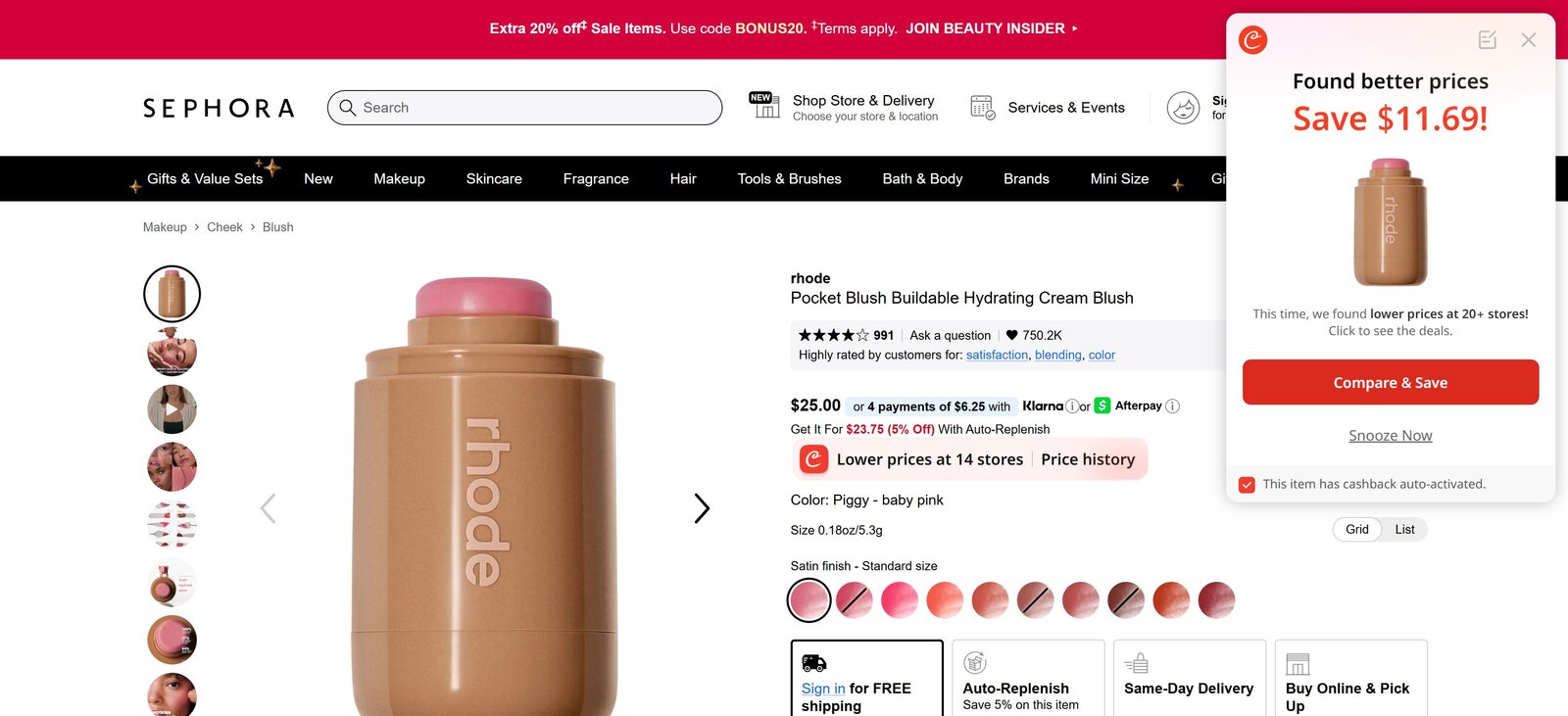
For more timely purchases, Price Comparison will help you find out whether or not a product is cheaper elsewhere on the web. My wife’s pocket blush was a whopping $11.69 cheaper than the $25.00 she normally pays at Sephora. She’d have never known that without Coupert. One click later, she’s checking out for nearly half the price — and that’s with no coupon code or cashback yet discovered.
Where Coupert Stands Out
After spending some time with the extension in real shopping scenarios, a few pros where Coupert shines became pretty clear.
 Coupon automation that works. This is where Coupert does its best work. It runs through available coupon codes automatically and applies whatever sticks, which saves a lot of time and avoids the usual mess of coupon sites. Additionally, their Auto-Test Guarantee is a cool, proprietary touch. If Coupert finds coupon codes on three qualifying purchases but none of them work, they credit your account with $3.
Cashback you can actually see getting tracked. Cashback rates themselves aren’t groundbreaking, but I like how Coupert handles tracking. After you activate cashback, it shows a transaction (Purchase) ID tied to your purchase. That might sound small, but it’s reassuring. You know the click was logged, and you have something concrete to reference if a transaction doesn’t post the way you expect.
Huge merchant coverage. Coupert supports a massive number of merchants, including plenty that larger platforms quietly skip because the cashback rates are low. From a user standpoint, I actually see that as a positive. Even small percentages add up over time, and it feels more user-friendly than filtering stores out just because the margins aren’t great for the platform.
Noticeable without being annoying. Some extensions are so quiet you forget they exist; others get in your way. Coupert lands somewhere in the middle. The interstitials and animations are noticeable enough to catch your eye on busy checkout pages, but not so aggressive that they derail the shopping experience.
Automatic withdrawals with a very low minimum. This is an underrated feature. You can set automatic payouts as low as $1, which means balances don’t just sit there and get forgotten about. It also removes the risk of future policy changes or dormant account fees quietly eating away at your earnings.
Works on big-box retailers like Amazon. Most cashback and coupon tools barely do anything on big-box sites, especially Amazon, where discounts are rare and tightly controlled. Coupert won’t magically create savings there either — but it will still test and apply known promo codes or shipping deals when one surfaces.
Extra earning options if you want them. Coupert also includes additional ways to earn beyond shopping, like referrals and a built-in offerwall with surveys and partner deals. These aren’t high-ROI or truly passive, and I wouldn’t use them as the main reason to sign up. That said, if you already take paid surveys or refer friends occasionally, it’s convenient to have those options inside a platform you’re already using and trust.
Broad international availability. Coupert isn’t tightly locked to one country. Because it’s more merchant-focused than region-gated, users in North America, Europe, and parts of Asia are more likely to see supported stores. It’s not the main reason to use Coupert, but it’s a nice plus for international shoppers.
Where Coupert Could Improve
No tool is perfect, and Coupert does a lot right. Here are a few areas where Coupert could be smoother in day-to-day use.
 Savings features don’t always appear instantly. Coupert doesn’t always pop up the moment a page loads. On some retail sites — especially larger ones with a lot going on — it can take 20–30 seconds for coupon or cashback offers to show. That’s not unusual, but it does mean you may need to pause briefly at checkout instead of clicking through right away.
Can feel a bit heavier on older computers. When you apply coupons or activate cashback, Coupert opens a second pinned tab to make sure your purchase is tracked correctly. That extra step helps with accuracy, but on older or slower computers, it can cause a short delay or potentially freeze your browser altogether.
Fewer “flashy” cashback boosts. Some cashback tools run short-term promotions where they temporarily bump up cashback rates to grab attention. Coupert usually sticks to the standard rates offered by the retailer. That keeps things predictable, but it also means fewer eye-catching spikes designed to create urgency.
Cashback takes time to fully post. Cashback isn’t instant. Purchases usually show as pending within a few days and then take a few weeks to fully confirm. This is normal across cashback apps, but it’s worth knowing upfront so you’re not checking your balance after every order.
Withdrawing From Coupert
Withdrawing earnings from Coupert is straightforward, and it’s one area where the platform subtly does better than competitors.
Once your cashback is confirmed, you can withdraw your balance for free PayPal cash, redeem it for gift cards, or cash out to a debit card. The low minimums make it easy to keep money moving instead of letting balances sit.
I like the auto-withdraw option in particular. Instead of manually checking balances or waiting to hit a higher threshold, Coupert can automatically send payouts once your minimum is reached, and you can manually set the threshold to whatever you want.
Withdrawal options (quick overview)
- PayPal: $1 minimum for your first withdrawal, $10 after that; PayPal applies a small processing fee.
- E-gift cards: $1 minimum for first-time withdrawals, $10 after; no handling fee, but cards are country-specific.
- Debit card: $1 minimum; small processing fee applies (debit cards only).
A quick note on privacy, data, and cashback extension concerns
If you’ve used browser shopping extensions before, you’ve probably seen questions come up around tools like Honey or Capital One Shopping — particularly around how affiliate tracking works. Those concerns escalated in late 2024, when several large YouTubers and investigative creators publicly questioned whether Honey was overriding affiliate links even when users didn’t actively interact with the extension. That episode made a lot of shoppers (myself included) more cautious about installing anything that runs quietly in the background.
Based on my testing, Coupert didn’t behave that way. Cashback only activated after I explicitly clicked to enable it, and the extension surfaced a transaction (Purchase) ID afterward, which is how Coupert confirms a tracked click. I didn’t observe Coupert triggering attribution or overwriting links without some form of user action.
On the data side, Coupert collects the kinds of information you’d expect for a cashback tool — shopping activity at supported merchants, basic account details, and technical data needed to make the extension function. According to its privacy disclosures, it doesn’t sell personally identifiable information. That puts it broadly in line with other major cashback and coupon extensions, rather than doing anything unusually aggressive.
The short version: Coupert isn’t a zero-data tool, but based on what I could see, it operates within normal industry boundaries and didn’t raise any red flags during testing.
How The Coupert App Compares to Other Savings Tools
If you’re deciding between the Coupert app and popular alternatives, here’s how it compares in everyday use.
Coupert vs. Honey
Honey and Coupert overlap the most on paper feature-wise. Both focus heavily on automatic coupon testing, and in many cases, they’ll surface the same codes. Where Coupert pulls ahead for me is in what happens after coupons — it adds actual earning opportunities on top (e.g., cashback, paid surveys, etc.), rather than stopping at discounts.
Honey feels lighter and sometimes faster at checkout, but it’s also more limited in scope. If your main goal is hands-off coupon application, Honey is fine. If you want coupons plus the ability to earn and cash out real rewards over time, Coupert feels more complete.
Coupert vs. Rakuten
Rakuten is built around cashback and works best when you’re willing to plan purchases around it. Rates can be higher during promotional periods, but earning usually requires starting your shopping session through Rakuten and paying attention to category boosts.
Coupert takes a more hands-off approach. It runs at checkout, tests coupons automatically, and surfaces cashback when available without changing how you shop. Cashback rates may be lower on average, but Coupert covers far more merchants, which may result in higher earnings in the long run.
Coupert vs. Capital One Shopping
Capital One Shopping is great at price comparisons and occasionally surfaces strong, targeted deals — but it’s also more gated (US only). Certain features and merchants are restricted, and the tool feels more tied to Capital One’s ecosystem — expect frequent targeted advertising aimed at converting users to their banking and credit products.
Coupert is more open-ended. It works across more merchants, and the low withdrawal thresholds make earnings easier to access. Capital One Shopping can deliver bigger wins in specific scenarios, but Coupert feels more consistent and less restrictive for general use.




Final Verdict
After using Coupert across real purchases, my view is that the free version already does what most people want it to do. It automatically tests coupons at checkout, applies what works, and finds cashback opportunities when they’re available. For a free tool, that alone puts it ahead of most extensions, especially if you value the convenience of what amounts to earning passive income you’d have lost out on otherwise.
I say “free version” above because, interestingly, Coupert offers another browser extension called Coupert Pure, which is a separate, paid upgrade. It’s $2.99 per month (discounted at $22.99 per year) with one massive difference: the free version operates within the standard affiliate model (which is how virtually all tools in this category stay free), whereas Coupert Pure removes that layer altogether — it’s optimized solely to surface the best possible coupon or price for you.
That distinction matters more than it sounds. If a free tool finds a coupon that saves you $10, that’s still a win. But if a different coupon exists that saves $25 and applying it would break the commission, you’ll never see it. Coupert Pure is designed specifically to eliminate that tradeoff. On larger or less frequent purchases — furniture, electronics, travel bookings, photo orders — a single stronger coupon can easily outweigh the cost of the subscription.
That doesn’t mean everyone should pay for it. For everyday shopping, the free version already captures most of the available value, and cashback remains a long-game benefit either way. (Our team estimates you’d need to spend roughly $2000-$3000 per year in eligible cashback savings activity to recoup the cost).
My takeaway is simple:
Use the free version by default. If you regularly make larger online purchases where a single coupon can meaningfully move the total, Coupert Pure can make sense purely on the math — not because it promises more savings, but because it removes the incentives that can sometimes get in the way of finding them.
Install Coupert for free, see what it saves you in real use, and only consider Pure if the numbers justify it.


